How I Use My Palm™ OS
|
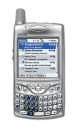 My
current handheld organizer is also my mobile phone: a
Palm� Treo�
smartphone (see photo at right). I use it similarly to how I
used my previous Palm� OS handheld organizer, with the added plus of it
being my mobile phone, so I have all the organizer features available
whenever I have my phone. (It's a whole lot easier carrying one geek
gadget instead of two.)
My
current handheld organizer is also my mobile phone: a
Palm� Treo�
smartphone (see photo at right). I use it similarly to how I
used my previous Palm� OS handheld organizer, with the added plus of it
being my mobile phone, so I have all the organizer features available
whenever I have my phone. (It's a whole lot easier carrying one geek
gadget instead of two.)|
That's a bit cumbersome, but what should we call them these days? They used to be known as "Palm� Pilots," but "pilot" was dropped from the name several years ago. "Palm PCs" these days seem to include handhelds running versions of Microsoft Windows, not just the Palm� Operating System. So, for now, Palm� OS Handhelds, Organizers or Computers seems best.
If you're thinking of getting a new, Palm� OS unit, there are others out there beside those made by Palm. For example, Sony and Handspring makes Palm� OS handhelds with features not found on those by Palm, including higher resolution screens, MP3 players, etc. There are literally thousands of programs available for Palm� OS, ranging from games to medical diagnosis. The list is extremely diverse, including religious texts, sports schedules, Internet email and web browsing, television scheduling, photo albums, password storage, spreadsheets, word processing, and more. You can find this software all over the web, but several sites specialize in Palm� OS software collections. A couple of these I've found useful are Handango and PalmGear. I'm sure I don't even come close to getting everything out of my Palm� unit that I can, but here's what I've come up with. (If you have suggestions for things I should try, or include here, let me know!) |Contacts | Appointments|
PC Files |Databases |Data
Communications | Character Recognition |
"Hacks" |Security
| Back-Up | File Management |Installing |
Launchers |Offline Browsing |
Photos | Money | Games |
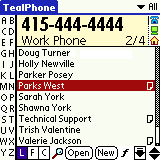
Texts | Using My Palm� Organizer For WorkWith work-related information easily and quickly accessible on my Palm� handheld I come across as organized and in control. Here's some of the work-related software and data I keep on my handheld: ContactsLet's start with the address book. Having all my important contacts in my pocket, searchable, complete with any detailed information I enter (phone numbers, addresses, account numbers, etc.) is fantastic. I can get to this info quickly without having to be at work and run to my desk.
Appointments
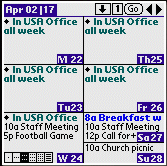
I don't even come close to using all its features, so I won't even try to describe them. Take a few minutes to visit the DateBk5 web site and see if it has features that would be helpful to you. And there's a side benefit from registering this program: you'll be supporting wildlife conversation, specifically Gorilla Haven in the mountains of North Georgia (USA). PC FilesYes, you can view, and even edit, spreadsheets, word processor document, and other documents from your work PC on your Palm� organizer. There are several programs and suites for this, but the one I use is Documents To Go. I use it with Microsoft Word documents and Excel spreadsheets. The documents can be stored on the unit's memory card (also known as VFS memory, for virtual file system � where do they come up with these names?), so they don't use up precious system memory. (This is an instance where I did go with the default program, since Documents To Go came with my Palm� organizer.) Among my responsibilities are supervision a staff of broadcast news technicians. I transfer their schedules from our Avstar newsroom computer system into Excel spreadsheets, format the spreadsheets for easy use (colors, etc.), and load them onto my organizer so I always have them close at hand. This is especially useful when I'm not at work and a scheduling issue comes up. Also on my handheld is reference data on our vehicle fleet (tire sizes, etc.), rental satellite truck vendors, live television operation from local sports venues, fixing common computer problems, the area broadcast frequency coordination database (I handle Broadcast Auxiliary Service frequency coordination above 1 GHz for Atlanta), etc. DatabasesTo keep track of account numbers, passwords, web addresses, etc. I use a great program called SplashID, available by itself or in a suite of applications from SplashData. SplashID has both PC and Palm� OS versions, so you can add, edit and access your data on either device. (I find it's a real help to be able to cut and paste data from other programs into SplashID on my desktop, or use the keyboard to enter new data.) Both the desktop and Palm� OS versions can be configured to require a password for data access, and data is encrypted for further protection. There art several general databases out there for Palm� OS. I've played with both J-File and ThinkDB. I haven't done all that much with either, but ThinkDB is easier to use and much more powerful. Plus it has an optional PC version where users can both design and use databases, with all the advantages of the keyboard and mouse. Data CommunicationsOne of my responsibilities is manageing FOX5 Atlanta's Avstar� Newsroom Computer System, which means occasionally accessing the system's servers to take care of a glitch, etc. This can be done in person or from a PC with a modem... and I've figured out how to do it with my Palm� organizer and cell phone. My Nokia 3360 phone has an infrared (IR) port and an internal modem which can be accessed by a computer through this port. My Palm� organizer has an IR port, and programs can use that port for communications. (See the section on Online Communications, below.) So I did a little searching for a Palm� OS program that will do serial data communication through the IR port and found the free program ptelnet. I saved the dial command string as a macro (ATDT404#######), as well as a few commands I use fairly often. So now when there's a computer problem in the newsroom, as long as I have my M515 and phone with me I can often take care of the problem without heading either home or to the station. UtilitiesThe Palm� OS is like probably all computer operating systems � programmers keep finding things that it doesn't do that they wish it would, or things they wish it did a bit differently, so they write programs. Here are some I find useful: Character Recognition
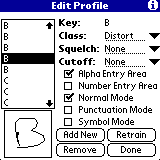
Well, the folks at TealPoint must have had the same question in mind, because they came up with an answer: TealScript�. Starting with Graffiti� characters, TealScript comes ready to recognize many other, common ways to write letters. Users can add their own versions off all characters, and there's a training mode where you write phrases and TealScript learns how to recognize your writing. System Extension ("Hack") Management
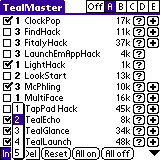
I won't go into details of what exactly TealMaster does here, and why I like it. If you need a program to manage hacks, though, take a moment to read the manual and I suspect you'll decide to give it a try.
There are many more hacks out there that you can find by searching Handango, PalmGear, or elsewhere on the 'net. SecurityPalm� OS has integral security which can "lock" the Palm at various times, as configured by the user. But it's fairly rudimentary, and can easily be circumvented. There are several programs to improve on the built-in locking mechanism, and one that seems quite effective comes from TealPoint. I bet you can guess it's name. Yup, TealLock�. If you think you might need it check out the program's web page. Back-UpWhat is it they say about computer backups? There are two types of people: those who backup their computers and those who lose data. While your main data files (Address Book, Datebook, To Do List, Memo Pad) are in effect backed-up to your PC or Mac at every HotSync�, the data from any other programs you're running is only transferred if the programs installed their own HotSync� conduits. So, to make sure all your data is backed up you'll need another program. Probably the best is BackupBuddy. And if your handheld has a memory card you can use its sister program, BackupBuddy VFS, to backup without having to HotSync� to a PC or Mac. File Management
Installing Palm� OS FilesIf you're someone who from time to time installs new programs on your handheld, you may find waiting for the HotSync� process to go through all its conduits (address book, datebook, third party programs, etc.) a waste of time, and going through the custom dialog to rest all the conduits to "do nothing" more trouble than it's worth. There's a solution: Pilot Install. This free program for Windows machines will take over the HotSync� process when you're installing files to your handheld, and only install the files. What a timesaver! And if you setup Windows to associate PDB and PRC files with Pilot Install, just double-click on a Palm� OS file, press the HotSync� button, and your file is installed in seconds. Believe it or not, this gem does even more! It can convert jpeg and bmp files into small programs that will display on your handheld � without a separate viewer program. (The free version does put a text banner on pictures, but there's a "Plus" version available for about $15.00 without this relatively minor annoyance, and with some additional features.) Fun With My Palm� HandheldLaunchersThe default application launcher is a bit pedestrian. I've tried several others, and for now I've settled on MegaLauncher. Check out the animated graphic to the right to get an idea of its features. Offline Web BrowsingI used to use AvantGo to download web pages to view later, but after a recent version upgrade it stopped working correctly. So, I did a web search and found a Free Software replacement: Plucker. While AvantGo has an automated system for "subscribing" to web sites (they call them "channels"), with Plucker it takes a bit of work. (Update: The Plucker team now has a Windows interface which makes things a whole lot simpler.) But once you've got it setup to your liking you'll have, as they say, "the web in the Palm� of your hand," and the pride of having done some of the work yourself. (They used "�" instead of "�" in that quote, not me!) Check out the Plucker Quick Start Guide for more details. Update: Well, now (October 2002) I'm using both AvantGo and Plucker. The web addresses I'd been using for some sites in Plucker just stopped working, but they were still available as AvantGo "channels." Since I liked having those sites on my organizer, I downloaded and installed the latest version of AvantGo, and it's working just fine. So now I have some web sites as AvantGo Channels, and some in Plucker. Photo Album
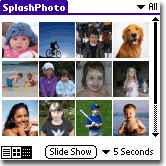
In preparing this section I visited their web page and learned that they've released a new version this month (August 2002) that can display jpeg files right off a memory card, and adds support for Sony high-resolution screens. Money and ShoppingSplashData also has programs to keep track of your finances, SplashMoney, and to manage shopping lists, SplashShopper. I've barely spent any time with them, but they both seem like they'll be of use to organized people. (Did I ever say I was organized? A lot of people seem to think I am, but I know better...) Splash Money can share data with Quicken and Microsoft Money, so one of these days I will spend some time with it. And no, I haven't gotten anything from SplashData to mention their products. I just find SplashID and SplashPhoto to be extremely useful (and expect to find Splash Money useful, too, once I spend some time with it) and worthy of mention. GamesI don't spend a lot of time playing games on my Palm, but with a 64 Meg memory card I have enough memory that I can devote some to non-essentials. There are a large number of games out there for the Palm, including versions of old, classic arcade favorites like Frogger and Galaxian. TextsThere are a plentitude of books and other documents available in electronic formats which can be read on Palm� OS handhelds. For a large collection of free electronic documents (over 12,000 in August of 2002) visit MemoWare. I enjoy Science Fiction. Baen Books has both a Free Library and Webscription service where members can purchase books electronically, before they're available on paper. There are a few standard formats for Palm� OS text documents. One is called, of all things, "Doc" format. There are several readers for Doc format available, and the one I usually use is TealDoc from TealPoint. TV SchedulesDid you ever wish you could quickly check the television schedule for the next week while waiting in line in a store that doesn't have a rack of TV Guides at the register? Wouldn't it be great if you could quickly check when your small number of favorite shows are on, and which episode it will be, without going through all the listings? Then check out the Pocket TV Browser from PIMCity. Online CommunicationsOccasionally I use my handheld online, using its IR port to access the modem built into my IR-equipped Nokia 3360 cell phone and surf the web. That's right � you don't need a handheld specifically designed for wireless communications, as long as you have a wireless phone that can make data calls, and the phone either has an IR port (easiest) or you get a data cable to connect it to your handheld. A fantastic resource, with "how�to" guides and more, is www.mywirelesspalm.com. If you're interested in giving this a try, and you still have questions after reading this section, take the time to visit and read some of their articles. One that's all-but essential is titled "Here's all you need to know about getting your Palm wirelessly connected to the Web." TCP/IP is the networking protocol on which the Internet is based, and Palm� OS has TCP/IP networking built-in. What you'll need, though, is a dial-up Internet account. If you're like many of us technophiles, you probably gave up your dialup account and now use a cable modem or DSL to access the 'net from home. Perhaps your fast Internet account comes with dialup access for when you travel. If so you're all set. If not you'll need a separate account to use with your handheld over your cell phone. But remember, this account can also serve as a backup for when your cable modem or DSL goes out. I found what I consider to be an incredible deal with Access4Less.net, $5.95/month. Once you have your dialup Internet account you'll need to configure your handheld to use it. This is done through the Preferences application. In the upper-right is a dropdown control to access various Palm� OS options. Choose "Network." Then tap the Menu button and select "New" to create a new service. Give the service a name. For example, I used the service name "A4L" for my Access4Less.net account. Next enter the user name you use to log onto your account. You can also enter your password, but if you'd rather not you'll be prompted for it each time you connect. Then choose a Connection with the dropdown control. I use "IR to Phone," but if you connect with a cable you would probably choose "Serial to Phone." Then enter the dialup phone number and you're ready to go. Connect your cable, or enable IR on your phone and point your handheld's IR port at the phone's port, and click on the "Connect" button. Watch your phone's display, and you should soon be connected. To disconnect your call some communications programs will have their own control, but if not just get yourself back to the Network Preferences screen and tap the "Disconnect" button. If your Internet provider has multiple access numbers you'll probably want to add additional entries for several of those numbers. Since the rest of your connection data will be the same, tap the Menu button but this time choose "Duplicate" and just change the Service name (A4L2, A4L3, etc.) and phone number. There are Palm� OS programs for email, instant messaging, web browsing, and more. Check out Handango, PalmGear and other Web software libraries. Personally I get so much spam that I haven't tried email on my handheld, but web browsing is another story. I've been using both Handspring's Blazer (about $20) and the free EudoraWeb. But remember: the standard handheld screen is small, just 160 x 160 pixels. In this day of web pages designed for resolutions of 800 x 600 or greater and high-speed access, many web sites just won't display well on your screen � not to mention take a long time to download. But there are also many pages designed for mobile devices, often special versions of sites which normally display with large graphics. They're not all that difficult to find. For example, the default home page in Handspring's Blazer has a Google� search form which only returns sites designed for wireless access. I've only begun to scratch the surface of the communications possibilities with a Palm� OS handheld. If you're doing something interesting, let me know! ConclusionThis is just a small glimpse into how I use my Palm� handheld. Please let me know if you found it of any help in your use of yours. |
||||
|
Last updated on
21 August 2025
|

 Palm�
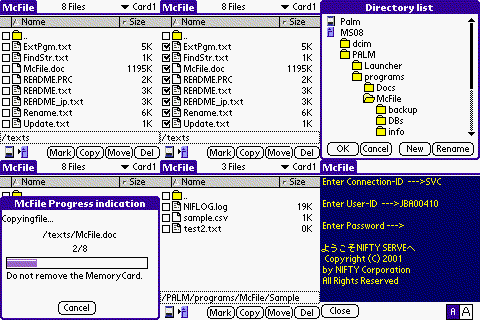
OS doesn't have anything like Windows Explorer (or, for your old
timers, Q-DOS or Norton Commander). With just the internal memory
a file manager may not be necessary, but add in removable memory
cards and you'll soon find you want a way to see all the files on
a card or in your handheld, transfer individual files back and forth,
etc. There are several Palm� OS file managers
out there, but the one I find most useful is McFile.
Palm�
OS doesn't have anything like Windows Explorer (or, for your old
timers, Q-DOS or Norton Commander). With just the internal memory
a file manager may not be necessary, but add in removable memory
cards and you'll soon find you want a way to see all the files on
a card or in your handheld, transfer individual files back and forth,
etc. There are several Palm� OS file managers
out there, but the one I find most useful is McFile.